


What to Do About a High IP Risk Score? How to Lower It
My IP risk score is high — what do I do? If you want to lower your IP risk score quickly, the core idea is to track down what's costing you points first. If a DNS leak or a cooling-off period can fix it, adjust locally; but once a datacenter range or a blacklist is involved, switching straight to a clean residential IP is the easiest move. Most accounts get flagged for more than one reason, and tinkering blindly usually makes things worse. Pin down the root cause step by step and you can push the risk back down.
Plenty of people buy a proxy node, use it to register for Claude or log in to a cross-border store, and get hit with an error popup — or an instant ban — only to check and find their IP purity is already flashing red. When your risk score just won't come down, there's no need to tear your whole setup apart and start over. Once you understand how the points get deducted, you can fix the actual problem.
Why your risk score is high
Why can someone else open the same page and sail straight through, while you get a human-verification challenge the moment you visit? The target site's anti-fraud system has already tagged your exit IP the second the connection is established.
The most common cause is a sharing count that's way over the line. Plenty of cheap proxy pools and shared nodes have hundreds or even thousands of people squeezing through the same exit at once. Take an IP with a sharing count of 800 and try registering for Claude or OpenAI with it, and there's a good chance you'll get stopped at the captcha step — simply because the volume of sign-up requests coming from that exit in the same window is so dense. The risk system doesn't even need to look at how you behave; the request density alone is enough to mark it as abnormal proxy traffic.
The wrong IP type will also push your rating straight up. Many of the cheap lines sellers offer are really datacenter IPs — commercial servers that public databases flagged long ago. Normal home users don't sit on a cloud server browsing the web 24 hours a day, so when a risk engine sees server attributes, it gets suspicious by default. Even if a provider advertises a dual ISP line, if the underlying broadcast attributes are still registered under a datacenter, it will still be recognised as one, and its weight gets slashed.
A dirty history is just as deadly. If this address was previously used to run bulk crawlers, send spam, or brute-force logins, it's probably already on a blacklist — for how to check and get it removed, see What to Do If Your IP Is Blacklisted: How to Check and Remove It. Everything might look calm when you take it over, but its record in the major threat-intelligence databases hasn't been wiped yet. Those negative records keep syncing through network logs into the blocklists of e-commerce platforms, payment gateways, and social sites, so you start out carrying someone else's blame. Whether a blacklisted IP can be cleaned, and how long it takes, see Can an IP on a Blacklist Be Cleaned? How Long Does It Take?.
Proxy giveaways in your protocol and network setup can drag the score down too. Things like your local system timezone not matching the exit IP's city, an unusual packet MTU value, or your browser's WebRTC leaking your real local-network address. When WebRTC sets up a connection, the ICE candidates it exchanges include your local address — see the ICE protocol (RFC 8445). Stack those details together and even a fairly clean exit can see its overall score climb fast.
Check yourself first: check it once on the homepage and see what's costing you points
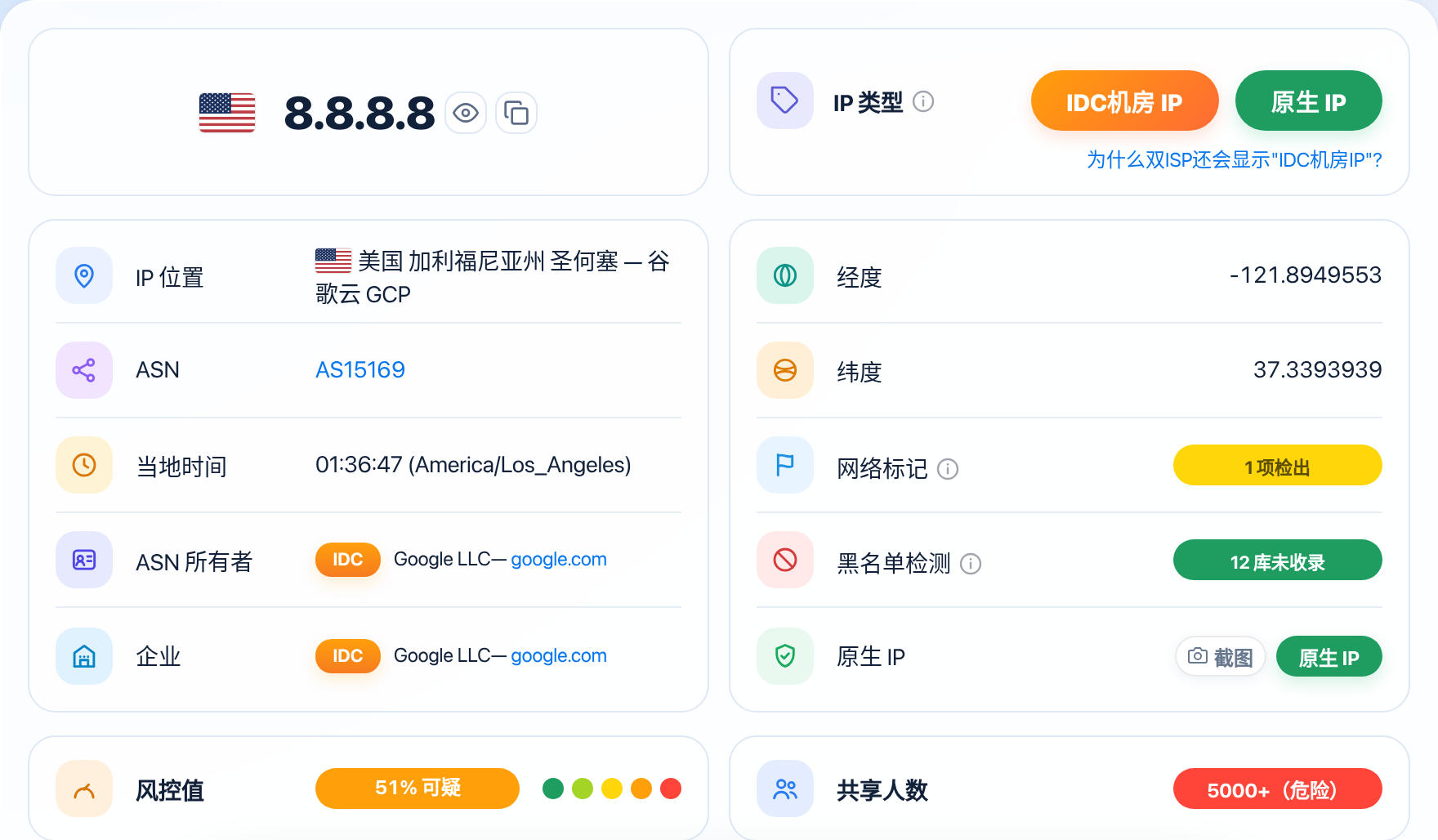
Before you start changing anything, don't guess. Just open ISPing.me and check it once on the homepage, and you'll get a full health check of every metric on your current node. Focus on two core dimensions: which tier the overall score falls into, and the specific risk factors listed in the details.
Once the results are in, look at which band the score lands in. ISPing.me splits the results into five clear tiers, and each tier is tolerated very differently by real services:
| Score Range | Purity Rating | Risk Status | What It Usually Means in Practice |
|---|---|---|---|
<20 | Pure | Almost no negative history; network behaviour looks natural | High pass rate registering for mainstream AI tools, cross-border e-commerce stores, and payment risk checks |
<35 | Fairly Pure | Occasional minor fluctuation, but overall reputation is good | Daily social media work, unblocking overseas streaming, and ordinary account logins mostly go smoothly |
<50 | Fair | Some history of past use or light sharing | Sensitive platforms occasionally trigger a second verification; best paired with a separate fingerprint environment |
<70 | Suspicious | Clear abuse history or exposed datacenter attributes | Registering a new account is very likely to be rejected; frequent activity on an old account may trigger a security lock |
≥70 | High Risk | Deep contamination, heavy concurrent sharing, or already blacklisted | The vast majority of commercial sites block it outright, and continuing to use it will very likely get the account banned |
After the total score, scroll down to the sharing count in the details. The sharing count also comes in five tiers: 1-10 is Excellent, 10-100 is Good, 100-500 is already Poor, 500-5000 is Very Poor, and once you jump to 5000+ you've crossed into the Dangerous red line.
Put the two sets of numbers together and you can quickly tell what matters most. If the total score says Suspicious or High Risk, but the network type shows residential broadband and the sharing count sits at 10-100, chances are your local DNS setup is leaking, or the previous user just ran a burst of traffic through it — both locally fixable. On the other hand, if the results flat-out show datacenter attributes, or the sharing count has already shot into 500-5000 or higher, the problem is in the underlying line itself, and no amount of tweaking local software settings will save it.
4 ways to lower your risk
Once you've found what's costing you points, you can get to work on the specific problem. These four practical fixes are ordered by how fast they take effect — walk through them against your own report one by one.
Switch to a clean residential IP
If your business puts a premium on account standing — say, growing a US TikTok account, registering for Stripe payouts, or running an Amazon store long term — the safest move is to replace the datacenter line with a native residential broadband IP. When you're choosing, don't just trust the seller's poster claims. Before you pay, ask support for a test node and confirm the ASN belongs to a real local broadband provider (Comcast, AT&T, or BT, for example), not a cloud vendor. For tips on picking a proxy IP, a couple of minutes of checking before you buy can save you a lot of trouble later — for the pitfalls to avoid, see How to Choose a Proxy IP: A Guide to Avoiding Pitfalls and Picking Right. Once you're connected to the new node, clear your browser cache and cookies completely before logging in again, so leftover markers from the old setup don't contaminate the new line.
Actively avoid heavily shared ranges
Some dynamic residential broadband pools look residential on paper, but the provider oversells them so hard that the same C-block — or even the same exit — gets passed around by hundreds or thousands of people dialling in turn. When that happens, disconnect and reconnect in your proxy client right away to grab a different exit node, or manually switch region and city in the provider's dashboard, deliberately avoiding the popular default nodes (the default US Los Angeles or Singapore line, for instance, is usually jam-packed). Every time you reconnect successfully, check the sharing count on the test page and keep it steady in the 1-10 Excellent or 10-100 Good range before you start registering or paying for anything.
Find and plug DNS leaks
Sometimes the exit IP itself scores under 20 — solidly Pure (for how to read each tier, see What IP Purity Score Counts as Clean? How to Read Each Tier) — yet overseas sites still flag you as abnormal. The problem is usually a DNS leak. When your traffic goes through an overseas proxy but your local system still sends domain lookups to your home country's ISP DNS servers, the target site can see at a glance that your real location and your exit don't match at all. The fix is straightforward: open your computer's network adapter settings and change both the IPv4 and IPv6 default DNS to an overseas public resolver (such as 1.1.1.1 or 8.8.8.8); then turn on "remote DNS resolution" or the "DNS hijacking" switch in your proxy tool's settings, so every domain query goes out through the encrypted tunnel and never over a direct local connection. By default, DNS queries are sent in plaintext — even an HTTPS site can't hide the lookup. See DNS queries are sent in plaintext by default. After fixing it, run a quick check for any real-IP leaks, see How to Test Whether Your Proxy Is Leaking Your Real IP?.
Give a dedicated node time for the risk score to decay
If you're holding a dedicated native residential broadband line and its IP risk score only spiked because you registered a bunch of accounts or switched logins in a short burst a few days ago, don't rush to throw it away. Risk systems usually score behaviour with a time-decay mechanism — just stop the high-frequency abnormal requests and let the node sit and cool off for 7 to 14 days. During that time you can use it now and then to browse the news or watch YouTube videos, mimicking a real home user's daily routine, and as the dynamic behaviour weight slowly falls back, the risk score will come down with it. How long it takes for the risk score to clear after switching IPs, see How Long Does It Take for a Risk Score to Clear After Switching IPs?.
When swapping IPs beats fixing them
Not every problem is worth the time it takes to fix. In the proxy world, once certain underlying hardware attributes and historical credit are set, there's almost nothing an individual user can do to turn them around — stubbornly trying will only waste your time and may even cost you a core account.
If you see any of these signals in your test results, don't hesitate — switching to a fresh line beats any amount of tweaking:
- It's already on a public blacklist: once a threat-intelligence database has a record, getting it removed is an extremely slow process, and it usually takes the address holder (the datacenter or ISP) emailing in appeal documents — something an ordinary renter has no power to do. Check first whether your own IP is listed at the Spamhaus blocklist lookup and delisting portal, then decide whether to appeal or just switch lines. Even if you occasionally manage to get one database to delist it, dozens of other commercial risk databases will still hold the bad record.
- Sharing count has shot up to the
5000+Dangerous tier: this is the classic ten-thousand-riders public pool, with thousands of devices running automated scripts through it every day. Even if you browse perfectly by the book today, hundreds of strangers are hammering the same exit with API calls in the very same second, so the risk score can never come down. - The underlying line is firmly flagged as a datacenter IP: as long as the ASN is registered to a datacenter, no amount of changing browser fingerprints, switching operating systems, or adjusting DNS will help — the target platform can tell it's a datacenter IP at the TCP handshake stage. For any business that needs long-term stability, dropping this kind of line and buying a high-reputation residential IP is the right way to stop the bleeding.
- A dynamic dial-up pool keeps jumping back into high-risk ranges: some cheap providers only have a handful of dirty ranges in the first place. You disconnect and reconnect ten times, and the new address you get still lands in the Suspicious or High Risk band — that means the whole pool's IP purity is already shot, and switching providers is a better bet than drawing lots inside the pool.
FAQ
My risk score is 80 — can I still use this IP?
A score of 80 already falls into the ≥70 High Risk band. Ordinary web browsing is fine, but using it to register new accounts, make cross-border payments, or log in to sensitive social media will very likely get you blocked outright or even banned. Check first whether DNS is leaking or the sharing count is over the line; if you can't fix it, switch to a new line.
I rebooted my modem and the new IP still has a high risk score — what now?
Some regional broadband providers hand out dynamic pools that are heavily polluted overall, so the new address you get after rebooting your modem may still sit in the same high-risk range. Try powering the modem off for 10 minutes before dialling again, so the broadband connection picks up an address from a different range. If repeated redials still come back high risk, you'll need a dedicated proxy node instead.
Why does a dedicated static residential IP I just bought still show a high risk score?
Dedicated only means you're the only person using it right now — it doesn't mean it has no history. If the previous tenant used it for bulk operations or triggered a platform ban, the bad record usually sticks around for weeks. In that case, contact the provider with a screenshot of your test result and ask for a free swap to a clean, unpolluted line.
I turned on global proxy mode — why can websites still recognise my real environment?
Global mode usually only takes over regular application-layer traffic. If your local system's DNS still goes direct to your home country's ISP, or your browser has WebRTC hardware passthrough enabled, your real network characteristics will still leak. You need to enable remote DNS resolution in your proxy software and disable WebRTC leaks in your browser.
Notes
- Don't trust a single test result: different platforms weight their threat-intelligence databases differently, so a low score on one test doesn't mean every site will let you straight through. Before doing anything important with an account, test the environment's stability with a throwaway account first.
- Switching nodes too often triggers risk controls: never hop between exits in different countries or cities every few minutes while logged in to an account. Even if every single node is clean, a huge geographic jump in a short time can get the account locked for abnormal location changes.
- Environment isolation matters as much as the line itself: even the cleanest exit can't save a browser fingerprint that's running naked. If you run multiple accounts, always pair them with separate browser profiles so cookies and local caches don't get mixed up between accounts.
Check your IP risk score
Enter an IP on ISPing.me to see its risk score, purity, sharing count, and all other risk signals in detail.
Check nowRelated reading:What Is IP Purity? How to Read the Risk ScoreWhat Is the IP Sharing Count, and Why Does It Matter?What to Do If Your IP Is Blacklisted: How to Check and Remove ItWhy Does Dual ISP Still Show as an "IDC Datacenter IP"?Residential IP vs. Datacenter IP: What's the DifferenceWhat Is a DNS Leak? How to Detect ItHow to Choose a Proxy IP: A Guide to Avoiding Pitfalls and Picking Right