


Why Is a Proxy IP's Risk Score Higher Than a Residential IP's?
Why is a proxy IP's risk score higher than a residential IP's? The fundamental reason is that the vast majority of proxy IPs on the market sit in commercial datacenters — their ASN alone gives away that they're servers, and they're shared by hundreds or thousands of people at high frequency, so abuse history piles up fast. A real residential IP, by contrast, belongs to a consumer broadband carrier, and its solo or near-solo use and natural daily rhythm earn it trust from risk systems by default. Residential proxies are the exception, though — pick a genuine native residential block and you can score just as low.
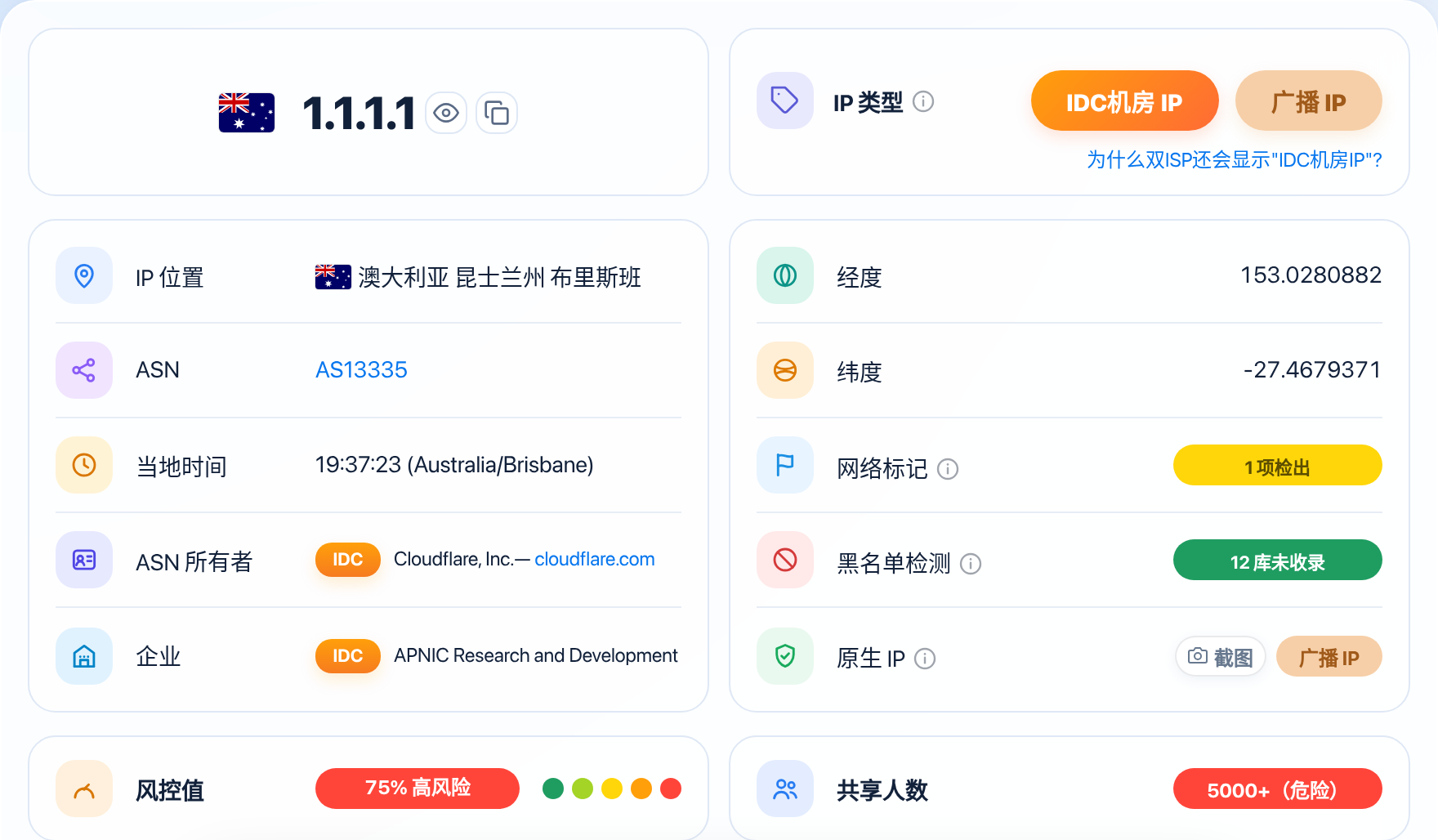
Plenty of people finish setting up a node, open ISPing.me and check it once on the homepage, then stare at the 75-point High Risk warning in confusion: this is a brand-new server I just bought, I haven't even registered a single account on it — why is its score so much higher than my home broadband? Once you pull apart how the two kinds of lines differ in their underlying network architecture, the answer is obvious.
What makes a proxy IP risky
The reason ordinary proxy IPs on the market light up red the moment you test them isn't that the check tool is picking on them — they carry three hard labels that commercial risk databases can spot at a glance.
The foundation of most cheap lines is a commercial datacenter datacenter IP. When cloud providers and hosting facilities apply for address blocks from the global internet registries, the organization type is registered outright as Hosting. Autonomous system numbers are assigned and managed by registries, which record the identity of the organization holding each number — see Autonomous System Number (ASN). The moment a target website's firewall establishes a connection, it can pull the public routing record and see that the address belongs to a server rack, not a home. Normal consumers don't sit in a datacenter browsing shops or scrolling short videos all day, so the server attribute alone pushes the baseline alert level straight up.
High-density sharing by many users is an even bigger problem. To spread out server rental costs, proxy providers often slice a single datacenter exit among hundreds or even thousands of users at once. The sharing count in a check report falls into five tiers: 1-10 Excellent, 10-100 Good, 100-500 Poor, 500-5000 Very Poor, and 5000+ Dangerous. Ordinary budget proxy services or public proxy pools routinely land in the 500-5000 Very Poor tier or even the 5000+ Dangerous tier — hundreds or thousands of requests pour out of the same exit in a single second, mixed in with bulk sign-ups, malicious crawlers, and credential-stuffing attacks. That flood of abnormal traffic keeps getting written into threat-intelligence databases, pushing the whole line's risk score toward the ≥70 High Risk range. For how many sharing users counts as too many, and when to switch IPs, see How Many Sharing Users Is Too Many? When Should You Switch IPs?.
Known proxy gateways and telltale relay fingerprints cost serious points too. Some public proxy nodes even share anonymous relay networks close to Tor exit nodes (Tor exit nodes are publicly listed in the official directory — see Tor exit nodes are publicly listed), or expose obvious SOCKS5 protocol or HTTP proxy protocol fingerprints on open ports (SOCKS5 has a well-defined handshake, so an open port gives it away at once). Threat-intelligence scanners crawl the whole internet every day, and the moment they catch an open proxy port, the entire /24 gets stamped as a high-risk anonymous proxy. For details, see How Proxy IPs and Tor Exit Nodes Affect You.
Why a residential IP is clean
A residential IP assigned to real household broadband gets treated completely differently across the internet's trust systems, and the logic behind its clean record rests on the same three core traits.
Its owning organization carries a natural consumer endorsement. Household broadband addresses belong to a carrier's ISP (internet service provider) business line — Comcast, AT&T in the US, or BT in the UK, for example. In commercial anti-fraud models, an ISP organization number stands for tens of thousands of real paying households, so platforms give these blocks a very high initial tolerance to avoid wrongly blocking genuine paying users, and the baseline score usually sits comfortably in the <20 Pure or <35 Fairly Pure range.
Usage is tightly concentrated, and the behavior looks natural. Behind a normal household broadband line there's usually just one family's phones and computers — three to five people — so concurrency sits firmly in the 1-10 Excellent tier. And real household usage follows an obvious day-night rhythm: browsing during the day, streaming video in the evening, deep sleep overnight, with requests coming at low frequency and spread out. You almost never see the 24/7 nonstop high-concurrency machine traffic of a proxy pool. For a detailed comparison of how the two kinds of lines differ in architecture and risk weighting, see Residential IP vs. Datacenter IP: What's the Difference.
| Line Type | Underlying Organization | Common Sharing Count Tier | Common Purity Profile | Suitable Use Cases |
|---|---|---|---|---|
| Ordinary datacenter proxy IP | Cloud provider / IDC datacenter | 500-5000 Very Poor or 5000+ Dangerous | <70 Suspicious or ≥70 High Risk | Only for ordinary web browsing and public data collection |
| Shared dynamic residential proxy | Consumer broadband carrier (oversold pool) | 100-500 Poor or 500-5000 Very Poor | <50 Fair or <70 Suspicious | Routine social media browsing, multi-account testing on non-core accounts |
| Dedicated static residential IP | Consumer broadband carrier (single household, exclusive) | 1-10 Excellent | <20 Pure or <35 Fairly Pure | Cross-border e-commerce stores, PayPal payouts, AI tool sign-ups |
| Real home broadband at your own house | Consumer broadband carrier (first-hand, direct) | 1-10 Excellent | <20 Pure | Local high-weight financial accounts and core main accounts |
Not every proxy is high risk
Before you go to the other extreme and decide that anything with the word "proxy" in it must be high risk — technically speaking, a proxy is just a way of forwarding network traffic. What decides the risk level is the nature of the address behind the exit, not the forwarding tool itself.
Compliant, high-quality residential proxies are the classic high-trust exception. These providers partner with local telecom carriers overseas and legitimately rent real household broadband gateways as exit nodes. When you browse through one of these nodes, the source address the target site sees is still a genuine residential broadband line, and the ASN still belongs to a local consumer telecom giant. As long as the provider strictly limits how many people share a single port, keeping concurrency in the 1-10 Excellent or 10-100 Good range, its IP purity is practically indistinguishable from real home broadband.
When shopping for residential proxies, watch out for one common disguise: a seller takes a block rented in a datacenter, announces it over BGP with a dual ISP label, and markets it as "enterprise-grade native residential." Despite the nice name, the underlying block is still a commercial server block, and its real-world risk performance falls far short of a genuine local native IP. For why a dual ISP label still shows up as a datacenter IP, see Why Does Dual ISP Still Show as an "IDC Datacenter IP"?.
How to read the risk score when choosing a proxy
Now that you know how wildly proxy IPs can differ from one another, don't just take a seller's word for it when buying — connect to a test port and keep your eyes on the three hard indicators below. Three minutes is all it takes to filter out a genuinely low-risk, clean line.
First, look at the overall purity score. If you're planning to sign up for Claude or ChatGPT, or run a cross-border e-commerce main store, the score has to stay strictly in the <20 Pure tier. If you're just maintaining older social media accounts or streaming overseas video, relaxing to the <35 Fairly Pure tier will still run smoothly. The moment a test result jumps to the <50 Fair tier or higher, skip it for any core business.
Next, check the concurrency in the details. Even if a residential line's current overall score is under 20, make sure its sharing count lands in the 1-10 Excellent or 10-100 Good tier. Some brand-new dynamic pools haven't been logged in the threat databases yet, so their score looks great — but hundreds of people are already crammed in behind the scenes, and within a couple of days the score will shoot straight up.
Finally, verify the ASN organization type. Open the autonomous system info in the report and confirm the organization is a real consumer broadband provider (ISP), not a cloud computing or server hosting company (Hosting). Get all three conditions — a low score, low sharing, and a genuine ISP — lined up together, and the line you pick will hold up against the vast majority of platform risk checks. For the full step-by-step checklist, see How to Choose a Proxy IP: A Guide to Avoiding Pitfalls and Picking Right. For how to verify a proxy before you buy it, see How to Verify a Proxy Before You Buy It.
A score is not fixed: after a few months on the same line, the number of shared users can quietly climb as new users join, and the risk score climbs with it. Even a line that tested below 20 when you first bought it deserves a monthly recheck — look at the score before you renew, and switch lines if it has slipped out of the clean band instead of waiting for an account to get flagged. For what to do when your risk score is already high, and how to lower it, see What to Do About a High IP Risk Score? How to Lower It.
FAQ
Why is my self-hosted proxy on a cloud server still high risk, even though it's dedicated to me alone?
Because the cloud provider's entire address block was registered as a datacenter from the moment it was allocated — it has nothing to do with whether you're the only user or whether anyone else shares it. As long as the exit comes from a cloud server, the target website will spot the datacenter attribute during the connection phase and assign it a higher risk weight.
Between a dynamic residential proxy and a static residential proxy, which one has a lower risk score?
For single-point stability alone, a dedicated static residential IP scores lower and is more predictable, because it's fixed to just you long-term. A dynamic residential proxy rotates through different household broadband exits on each redial, and if you hit a poorly managed oversold pool, you can occasionally land on an address the previous tenant just polluted.
My proxy IP's risk score is high — can I lower it by changing my local device fingerprint or switching encryption protocols?
No. Encryption protocols and browser fingerprints handle transport-layer traits and device-side environment isolation, while the risk score evaluates the exit address's own underlying record and history. Once an exit has been flagged as a high-risk datacenter block, the only fix is to switch to a clean residential exit.
A seller offers a residential proxy with "unlimited traffic" at a rock-bottom price — is it worth buying?
Stay well away. Real overseas household broadband is expensive to access, so legitimate residential proxies are usually billed by traffic or rented as dedicated ports at a premium monthly rate. A dirt-cheap "residential line" with unlimited traffic is almost certainly a cheap datacenter block in disguise, or a single broadband line sliced among thousands of people in an oversold dirty pool.
Notes
- Don't judge every business by the same proxy standard: signing up a main account or linking a card for payouts calls for a dedicated static residential line at
<20Pure; ordinary web browsing or public crawling runs fine on a regular datacenter line. Match the line to the job and you'll save the most money. - Re-test a dynamic residential proxy after every switch: different /24 blocks in a dynamic pool vary widely in cleanliness. After switching to a new city or node, spend a few seconds checking the score and sharing count before you log into an account.
- Even a dedicated residential line needs restraint: no matter how clean a native residential line is, it won't survive a burst of bulk sign-ups in a short window. Keep your daily operation frequency under control and the line will stay low risk for the long haul.
Check your IP risk score
Enter an IP on ISPing.me to see its risk score, purity, sharing count, and all other risk signals in detail.
Check nowRelated reading:Residential IP vs. Datacenter IP: What's the DifferenceWhat Is IP Purity? How to Read the Risk ScoreWhat Is the IP Sharing Count, and Why Does It Matter?How to Choose a Proxy IP: A Guide to Avoiding Pitfalls and Picking RightHow Proxy IPs and Tor Exit Nodes Affect YouWhat Is a Native IP, and How Is It Different From a Broadcast IP?What Is an ASN? An Autonomous System Number Explained