


How to Verify a Proxy Before You Buy It
How do you verify a proxy before buying it? The core principle is "test first, pay later — don't buy anything that fails the checks": before you place an order, ask the seller for a test port, connect to it, and verify five indicators in order — IP purity, sharing count, geolocation, real-world speed, and DNS leak protection — and only pay once all five pass. Even if customer support hypes the line as a first-hand exclusive native residential connection, walk away immediately if they can't provide a test node or the test lights up red with a high-risk warning.
The most expensive lesson new buyers of overseas lines learn is paying a full year up front because the sales page looked cheap and the specs looked good — only to find their account gets banned the moment they log in. Turn "how do I verify a proxy before buying" into a fixed set of checks, spend three minutes running through them, and you can keep the vast majority of second-hand dirty pools and oversold nodes out of your wallet.
The 5 must-test checks before you buy
Before you spend a cent, every proxy line has to clear five hard gates. Each of these five indicators maps to a different part of the exit's record: its history and reputation, how crowded it is, its physical location, its transfer efficiency, and how airtight the tunnel is. None of them can be skipped.
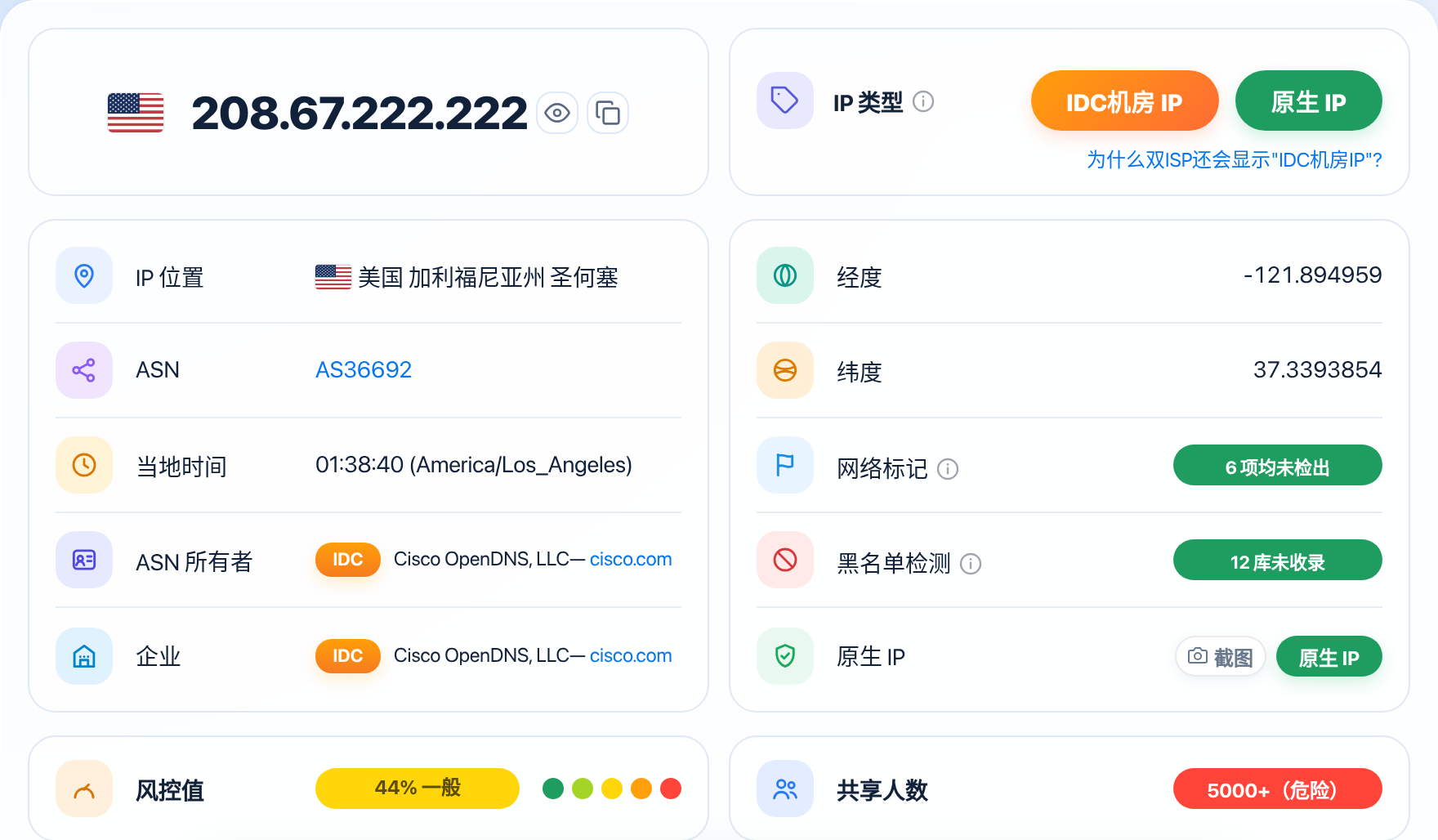
Check the IP purity score first. The check tool divides the risk score into five tiers: <20 Pure, <35 Fairly Pure, <50 Fair, <70 Suspicious, and ≥70 High Risk. If you're buying a line to register an overseas account or run a cross-border store, the test score must stay strictly in the <20 Pure tier; even if you're just maintaining an established everyday account, it must never go past the <35 Fairly Pure floor. For details on how to read each tier, see What IP Purity Score Counts as Clean? How to Read Each Tier.
Next, check the sharing count on that same exit. The report divides concurrency into five tiers: 1-10 Excellent, 10-100 Good, 100-500 Poor, 500-5000 Very Poor, and 5000+ Dangerous. An address with 800 concurrent users, for example, will very likely get blocked at the verification step if you use it to register for Claude, because requests from that exit are simply too dense in the same time window. When you buy a dedicated line, the sharing count must sit firmly in the 1-10 Excellent range. For a detailed breakdown of how to spot a second-hand shared pool, see How Can I Tell If an IP Has Been Used by Many People?.
After that, verify three basic usability indicators: first, geolocation and network type — confirm the country and city are accurate and the ASN belongs to a local consumer broadband carrier in the target country (a genuine residential IP), not a cloud datacenter; you can verify which organization an ASN is registered to through an RIR's Whois lookup (such as the ARIN Whois lookup — ARIN covers the Americas only; other regions use RIPE, APNIC, and the like); for details on what a proxy IP's ASN means, see What's the Deal With a Proxy IP's ASN?; second, real connection speed and packet loss — make sure overseas pages and videos load without endless spinning; and third, leak protection — confirm that once connected, local DNS lookups don't quietly go straight to a domestic carrier and cause a DNS leak.
How to get a test IP from the seller
Once you know what to test, the next step is getting a real test entry point from the provider. Any legitimate seller in this for the long haul already has a proper trial mechanism in place and won't ask customers to buy blind.
When you talk to customer support, state your testing needs concretely — don't just ask "can I try it?" You can say something like this: explain that you need to buy a US or Japan static residential node, and ask for a free 1- to 2-hour test port, or a pay-by-the-hour trial package that costs just a few yuan. If they can't offer it free, that's fine too, as long as they'll sell you a small one-day test for a few yuan and refund you if you're not satisfied.
When asking for a test account, keep one extra eye out for the "good goods for the test, dirty block for the real order" bait-and-switch. After you connect to the test port, write down the ASN (autonomous system number) and the /24 block it shows, and ask support directly: "After I place a formal order, will the long-term port I get come from the same ASN provider and the same tier of broadband pool as this test port?" Screenshot the chat and keep it — if the line they actually deliver turns out watered down, that's your most direct evidence for a dispute. And don't rush to order once you have the test port: run your full daily workflow through it first, confirm that account logins, payments, and checkouts all go through smoothly, and only then pay. If the test turns up a problem, you can swap it on the spot. For details on how to confirm your proxy isn't leaking your real IP, see How to Test Whether Your Proxy Is Leaking Your Real IP?.
Testing steps: check purity first, then speed, then leaks
Once you have the test port and connection details, run a full health check in the standard order below — the whole thing takes under three minutes and tells you exactly what kind of line you're dealing with:
| Test stage | What to do | Passing bar (recommended standard) | Danger signal |
|---|---|---|---|
| Check purity and concurrency | Connect to the node, then open ISPing.me and check it once on the homepage, and compare the total score and the details | Score <20 Pure (established accounts can relax to <35), sharing count 1-10 Excellent | Score drops to <50 Fair or worse, or concurrency exceeds 100 people |
| Verify network attributes and geolocation | Look at the ASN organization, network type, and blacklist status in the report | Belongs to a local consumer broadband carrier (ISP), location accurate, zero blacklist hits | Organization shows a Hosting cloud provider, or any blacklist entry lights up red |
| Test real connection speed and stability | Open major overseas HD video sites and your target business's official site, and refresh repeatedly | Pages open in under 2 seconds, HD video scrubbing buffers smoothly with no stalls | Pages spin for more than 8 seconds, or you keep getting connection reset errors |
| Check for DNS and local leaks | Check the country of the current DNS resolver and the browser's local address status | Resolver's location matches the exit country, no trace of a domestic carrier | Lookups go straight to a domestic telecom/Unicom carrier, or expose a local LAN segment |
When you actually run the checks, always look at the exit's underlying record first. Open the check page and read the score and sharing count: if that first step already shows <70 Suspicious or ≥70 High Risk, or the "native residential broadband" the seller bragged about turns out to be a commercial datacenter IP, don't waste any more time testing speed or leaks — drop it and move on to the next seller. For details on why a dual-ISP line can still show as a datacenter IP, see Why Does Dual ISP Still Show as an "IDC Datacenter IP"?.
Once the underlying record passes, open a few major overseas sites in an incognito browser window to test real throughput, and watch whether loading a dozen pages in a row suddenly drops the connection. Finish by checking for DNS leaks: confirm that with remote DNS resolution enabled in the proxy client, every domain lookup goes out through the overseas tunnel. By default, DNS queries are sent in plaintext, and HTTPS can't hide the lookup either (see DNS queries are sent in plaintext by default), so this remote-resolution step is not optional. For the full leak-check steps, see What Is a DNS Leak, and How Do I Detect One?.
Red flags: when to walk away without even testing
If the test results come back poor, don't talk yourself into paying anyway with a "good enough" mindset. If it's just one node that happened to be lightly polluted by a previous tenant (say, a score around 40), send the check screenshot to support and ask them to swap in a different <20 Pure port from the same pool and test again. But if two or three swapped ports all come back red with high risk, the whole batch is rotten — walk away for good. For where the line sits on salvaging a high-score line, see My Risk Score Is High — What Do I Do? How Can I Lower My IP Risk Score?.
While you're screening providers, any of the following danger signals means you should blacklist them without even testing:
- A seller who flatly refuses any form of testing: if they won't even open a pay-by-the-hour test package for a few yuan and insist you buy a monthly or even yearly plan outright, they're almost certainly sitting on a dirty pool shared by thousands of people and afraid a single test will expose it.
- A seller who won't put refund and line-swap rules in writing: before you order, ask plainly, "If the dedicated port you deliver tests over 50 on the risk score or lands on a blacklist, can I get a free swap or a pro-rata refund?" A seller who hems and haws has basically no after-sales support.
- A seller whose price defies the basic cost of broadband: real overseas household broadband costs what it costs to install. If someone claims "¥6 a month for unlimited traffic on an exclusive US native residential line," it's 100% a cheap datacenter IP dressed up as residential, or one broadband line oversold to thousands of people sharing it. For more industry pitfall-avoidance standards, see How Can You Tell If a Proxy Provider Is Reliable?.
Even if the tests pass, do not buy a long plan right away: start with the shortest cycle and run it for a full week before deciding whether to renew or scale up. During that week, recheck the score and the number of shared users at the same time every day, and run a DNS leak test as well, to confirm the exit is stable, has no cross-border broadcast range, and is not blocked by your target platform. If all seven days stay clean, renew monthly; if any recheck turns red, stop using it at once and ask support for a replacement or a refund, instead of finding out the money was wasted only after the whole plan expires. If the seller refuses a replacement or a refund, you can open a billing dispute through your payment channel — card issuers have a written dispute process (see the credit card billing dispute guide); follow your card issuer's dispute process.
FAQ
The seller will only show me a check screenshot from their own computer and won't give me a test port. What do I do?
Never trust a screenshot the seller provides one-sidedly. Screenshots are easy to fake with edits, and even a genuine one could be a hand-picked "showcase node" that has nothing to do with the pool you'd actually be buying from. Insist on testing a port yourself.
My test port scored 15 on purity, but the sharing count is over 200. Is it worth buying?
Not for running high-risk accounts. A sharing count over 200 sits in the 100-500 Poor tier — the low score right now just means the block is new and the threat databases haven't logged its stains yet. Within a few days, other users on the same block will drag the whole line into the high-risk range with their abnormal activity.
Why does the test IP load web pages fast, but I keep getting hit with captchas the moment I run my actual business on it?
Fast page loads only prove the server has plenty of physical bandwidth — they say nothing about the exit's reputation. Many commercial datacenters run 100 Mbps dedicated lines and test blazingly fast, but their underlying ASN was flagged as a datacenter long ago and is shared by thousands of people. Before you buy, purity and sharing count have to be your core entry requirements.
The official proxy I got after paying is completely different in quality from the one I just tested. What do I do?
Stop logging into any core accounts on that line immediately, keep the screenshots from the test phase and a side-by-side check report of the officially delivered port, and contact support right away to demand a swap to a clean block under the same ASN. If they stall or refuse, open a transaction dispute through your payment channel and ask for a refund.
Notes
- Never test with your main core account: when you're verifying a test port's connectivity and usability, test with the check tool and ordinary public web pages only. Log into your real business accounts only after everything checks out, so a bad test doesn't drag your main account down with it.
- Test a dynamic residential pool at several different times and in several different cities: if you're buying a pay-by-traffic dynamic dial-up pool, redial and switch to 3 to 5 new exits in a row during testing, and only top up in bulk once you've confirmed that every newly assigned address holds a low score and low sharing count.
- Learn to tell "protocol connected" apart from "business usable": some nodes can reach the internet and test at normal speeds, but sit on a cross-border broadcast block that streaming services and AI platforms block outright. Open your target platform's homepage during testing and confirm there's no region error — that's the safer move.
Check your IP before buying a proxy
Check your network environment on ISPing.me — confirm the purity, sharing count, and risk signals, and only use it once it passes.
Check nowRelated reading:How to Choose a Proxy IP: A Guide to Avoiding Pitfalls and Picking RightWhat Is IP Purity? How to Read the Risk ScoreWhat Is the IP Sharing Count, and Why Does It Matter?What Is a DNS Leak, and How Do I Detect One?How Can I Tell If an IP Has Been Used by Many People?Why Is a Proxy IP's Risk Score Higher Than a Residential IP's?My Risk Score Is High — What Do I Do? How Can I Lower My IP Risk Score?