


Will Multiple AI Accounts Sharing One IP Get Linked?
Will multiple AI accounts sharing one IP get linked? Yes — once one account triggers a violation or an abnormal ban, every other account sharing the same exit is very likely to get banned along with it. Modern anti-fraud systems don't just record the exit address; they cross-check browser fingerprints and usage rhythms too. If you need to run several accounts, the safest approach is to stick to one dedicated residential IP per account, with a separate browser environment for each, so they're fully isolated from one another.
Plenty of people buy a decent line to save on proxy budget, then get into the habit of rotating two or three spare accounts on the same computer — or even share the node password with a colleague. Everything seems fine while it's quiet, but when a platform runs a concentrated risk-control wave, the whole batch of accounts often gets wiped out within minutes. Before you hand out lines, open ISPing.me and check your current exit's concurrent status on the homepage first, and get a grip on the underlying logic of association risk before you do anything.
How platforms decide accounts are linked
When a risk system builds a user-relationship graph behind the scenes, it never draws a conclusion from a single dimension. It cross-checks three layers of signals together: the network layer, the device layer, and the behaviour layer.
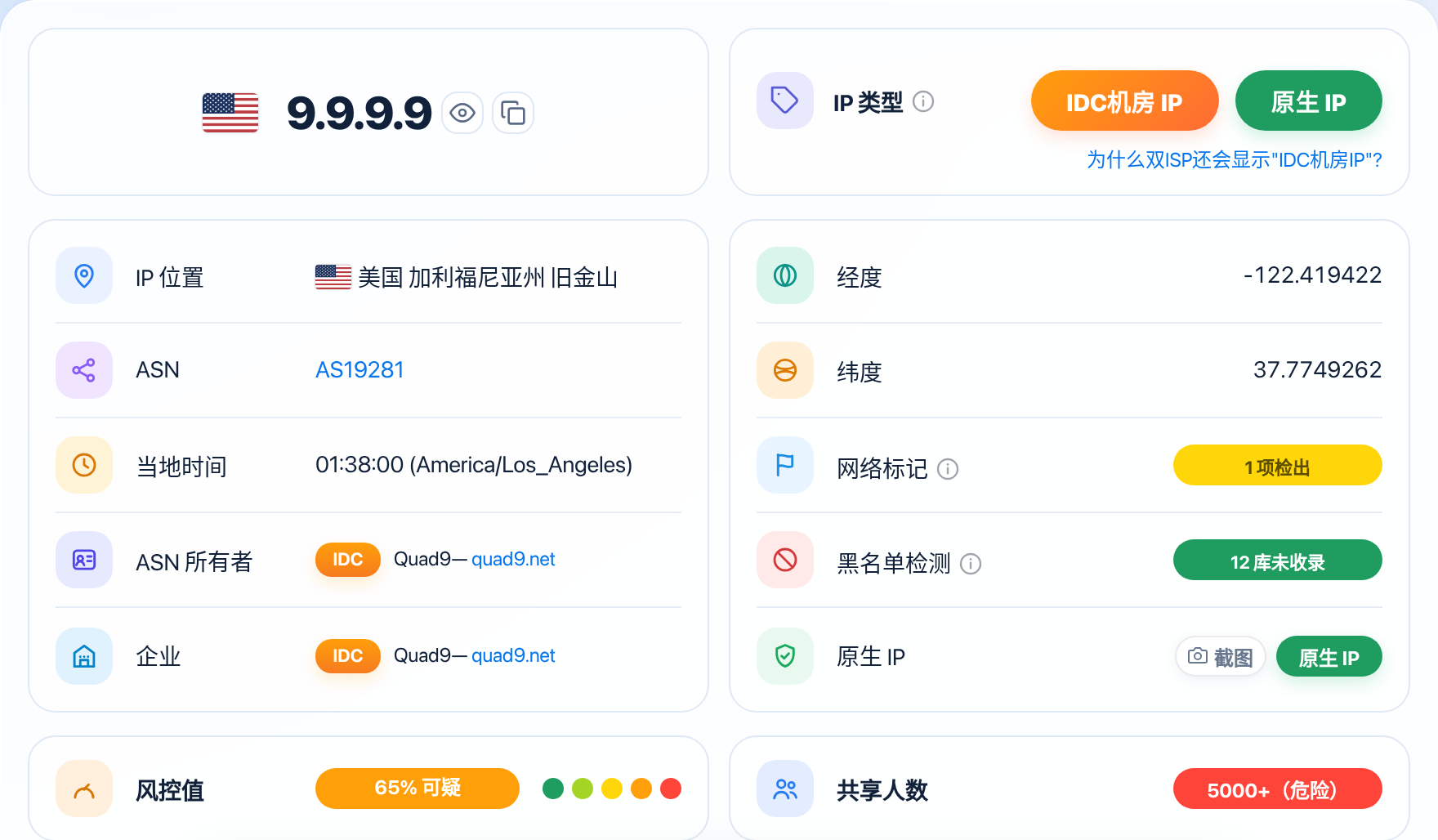
The network exit address is the most basic connecting anchor. When several accounts frequently log in or send chat requests from the same public address within a similar time window, the backend logs automatically generate a same-origin record. If that exit is itself a commercial datacenter datacenter IP, or the report shows a sharing count already in the hundreds, the system's suspicion toward multiple accounts on the same exit shoots up instantly.
Device hardware traits are the other hammer that locks the link in place. Frontend scripts on the site collect the operating system's graphics rendering hash, font library sequence, screen resolution, and local cache identifiers, and stitch them into a unique Can Your Browser Fingerprint Expose Your Proxy? How to Check It. Even if you clear your cookies every time you switch accounts, as long as you keep logging in from the same default browser window on the same computer, the backend sees a completely identical fingerprint hash plus the same network exit — and can immediately conclude that the same operator sits behind all of those accounts. Want to see what makes up your own browser fingerprint? Try it on the EFF's browser fingerprint test page. A 2010 study measured 18.1 bits of entropy in browser fingerprints, with 94.2% of fingerprints unique among browsers with Flash or Java enabled (see the browser fingerprint uniqueness study) — that only illustrates the principle, not today's numbers.
How synchronised your behaviour is will expose the link too. Say three accounts all come online in the same window every day, ask questions in highly similar templated phrasings, or were even registered with the same virtual credit card or the same batch of SMS verification numbers. Those heavily overlapping behaviour trails, stacked together, directly confirm a bulk multi-account violation. For the detailed mechanism of how environment and hardware traits trigger chain bans, see Why Does Claude Ban Accounts? IP and Environment Consistency Explained.
The risks of sharing one IP
Many users figure that as long as they aren't running malicious scripts, a few accounts chatting by hand normally should be fine. In reality, the chain reaction from sharing an exit is far more dangerous than it looks.
| Account Setup | Typical Sharing Tier | Association Risk Level | Typical Consequences |
|---|---|---|---|
| One account, one dedicated static residential IP | 1-10 Excellent | Extremely low (looks like a real household user) | Account weight builds up steadily; if one account has a problem it never spills over to the others |
| 2 everyday accounts on the same home broadband | 1-10 Excellent | Low (matches a family sharing a connection) | Normal manual use is basically safe — just don't hammer the API with high-frequency concurrent calls |
| Rotating 5+ spare accounts through the same exit | 10-100 Good | High (clearly looks like a studio bulk-farming accounts) | Triggers frequent verification popups; once one account is banned, the rest go down with it |
| Thousands sharing one proxy pool | 500-5000 Very Poor or 5000+ Dangerous | Extremely high (high-risk public pool under full monitoring) | New accounts banned instantly; old accounts can be wiped at any time because a stranger on the same range broke the rules |
The deadliest risk is the "one ban takes all" chain mechanism. When four or five accounts are bound to one exit and just one of them gets banned for triggering a sensitive word, a payment card decline, or a burst of high-frequency requests, the backend firewall immediately drags that exit's live risk score into the ≥70 High Risk band — and follows the association graph to suspend every historically active account on the same exit. Take OpenAI as an example: its Terms of Use explicitly prohibit sharing account credentials, and violations can lead to suspension or termination (see the OpenAI Terms of Use). For what to do when the risk score gets pushed up, see What to Do About a High IP Risk Score? How to Lower It.
Even before any ban lands, multiple people and accounts sharing an exit will burn through its credit fast. The test report splits the sharing count into five tiers: 1-10 Excellent, 10-100 Good, 100-500 Poor, 500-5000 Very Poor, and 5000+ Dangerous. Once you're running a dozen accounts making concurrent requests on the same node, the whole exit's traffic density starts to look like a machine cluster, and every account gets hit with slower responses, downgraded models, and endless human-verification challenges at the same time. For the general network setup logic behind multi-account anti-association across industries, you can also compare Multi-Account Anti-Association for Cross-Border E-Commerce: How to Pick Your IP.
The safe way to do it
If you want to get rid of multi-account association risk for good, the core principle comes down to eight words: dedicated lines, isolated environments.
On the network exit side, give every important account its own dedicated native residential IP. When picking one, run a test port check first and make sure the overall score lands in the <20 Pure tier and the concurrent user count sits firmly in the 1-10 Excellent range — steering well clear of second-hand dirty pools that hundreds or thousands of people have already used. For the hands-on method of verifying a line before you buy and spotting oversold shared ranges, see How to Tell If an IP Has Been Used by Lots of People and What Is the IP Sharing Count, and Why Does It Matter?.
On the device and storage side, physically split each account's operating space apart. Never switch between accounts by logging in and out in the same Chrome browser. At the very least, create a completely separate browser profile for each account. If you're maintaining more than three accounts, use a professional multi-login fingerprint browser, giving each window its own virtual graphics parameters, its own local cache directory, and a timezone and language that match the exit city — so every account looks like a separate computer somewhere overseas. For details on aligning timezone, language, and IP, see IP, Timezone, and Language: How to Keep Your Account Environment Consistent.
Stagger your daily usage rhythm deliberately too. Don't open every account at 9 a.m. sharp every day and fire off instructions concurrently. Leave more than half an hour between accounts, and let each one keep its own usual prompt habits and bookmarks. For the specific line-picking and environment-isolation standards for high-risk AI platforms, see What Do ChatGPT and Midjourney Require of Your IP?.
What to do if you're already linked
If you find that one account on a node has just received a ban email, or several accounts popped security verifications on the same day, the association chain has already been caught by the platform's risk controls. Don't panic and keep clicking retry in the same environment — stop the bleeding with the three steps below.
Cut off the high-risk exit right away to protect the accounts that are still alive. Once a ban has appeared on an exit, that line is fully exposed inside the target platform's firewall and must never be used to log in to any other account on the same platform again. Close every surviving account's browser window first, and thoroughly clear the browser cache and local storage.
Give the surviving accounts fresh, clean, separate environments. Buy several brand-new dedicated static residential IPs that score <20 Pure with a concurrent count in the 1-10 Excellent tier, and build each surviving account a brand-new browser fingerprint profile — making sure timezone, language, and remote DNS resolution all line up before migrating each login one by one. Before migrating, make sure the new line isn't leaking your real IP — for details, see How to Test Whether Your Proxy Is Leaking Your Real IP?.
For the first 3 to 5 days after moving into the new environment, keep the surviving accounts in a low-frequency quiet observation period. Just do a few simple normal chats each day. Don't change the bound email, swap passwords, or make large membership renewals during this sensitive window. Wait until the platform's security system confirms the new environment is stable and trustworthy and each account's internal abnormal risk score has gradually come back down, then resume normal use.
Once an account is saved, do not treat the new setup as a permanent safe: stagger the login rhythm of your accounts and avoid having several of them come online and send messages in the same minute — that kind of perfectly synchronized activity is itself a correlation signal. In the long run, keep a separate environment profile for each account and check them one by one when you change lines or devices; that saves far more trouble than rescuing accounts after the fact.
FAQ
My family has a real overseas home broadband line — if my family and I each log in to different AI accounts from our own phones, will we get linked?
Usually not. Real home broadband is meant to let three to five people in one household each use their own phone or computer on the same local network. As long as everyone uses their own physical device, nobody is bulk-registering accounts or scripting API calls, and the concurrent count stays in the 1-10 Excellent range, normal daily use is very safe.
If I use a dynamic residential IP and switch to a fresh address for each account, does that count as one IP per account?
It's still fairly risky. Fresh addresses from a dynamic pool usually come from the same ISP's C-block. If several accounts rotate through neighbouring ranges on the same day while sharing the same computer's browser fingerprint, risk controls can still link the accounts through range clustering and device fingerprints. For your main accounts, use a dedicated static residential IP.
I registered my accounts on different IPs, but later merged them onto one clean IP for everyday logins to save effort — is that okay?
It's very risky. Even if the new shared exit is a <20 Pure dedicated line, once you cram three or four previously independent accounts into the same exit and log in alternately at high frequency, a same-origin aggregation alert will trigger fast, and all the isolation effort you spent on registration goes to zero in an instant.
An account got chain-banned because of a shared IP — if I switch to a dedicated residential IP, can I appeal and get it unbanned?
Chain bans have a very low appeal success rate. If your main account didn't actually break any rules, first disconnect from the dirty node, switch to a <20 Pure dedicated home broadband line, and submit an English appeal through the official channel explaining that the network environment was misjudged. Occasionally a paid long-standing account gets a manual unban, but newly registered spare accounts are basically unrecoverable.
Notes
- Don't use your main account to test logins across several nodes just to check connectivity: for any newly bought line, always verify the score and sharing count with a test tool first, and only log in to its one dedicated account once it passes.
- SMS verification numbers and payment cards need one-per-account too: even if the network exit and device fingerprint are fully isolated, if five accounts are bound to the same foreign card or the same SMS number range, the payment gateway will still trigger a bulk association ban instantly.
- Never let several team members log in to the same credential from different places at the same time: if the team needs to share a high-value paid account, deploy it on one cloud desktop or one fixed dedicated line and have everyone access that same environment remotely, so the exit address doesn't keep jumping between cities.
Check if your IP links your accounts
Check your network environment on ISPing.me — confirm the purity, sharing count, and risk signals, and only use it once it passes.
Check nowRelated reading:Multi-Account Anti-Association for Cross-Border E-Commerce: How to Pick Your IPWhy Does Claude Ban Accounts? IP and Environment Consistency ExplainedWhat Is the IP Sharing Count, and Why Does It Matter?How to Tell If an IP Has Been Used by Lots of PeopleWhat Do ChatGPT and Midjourney Require of Your IP?What Is IP Purity? How to Read the Risk ScoreResidential IP vs. Datacenter IP: What's the Difference